
Anti-Glare vs Anti-Fingerprint Coating for Touch Displays
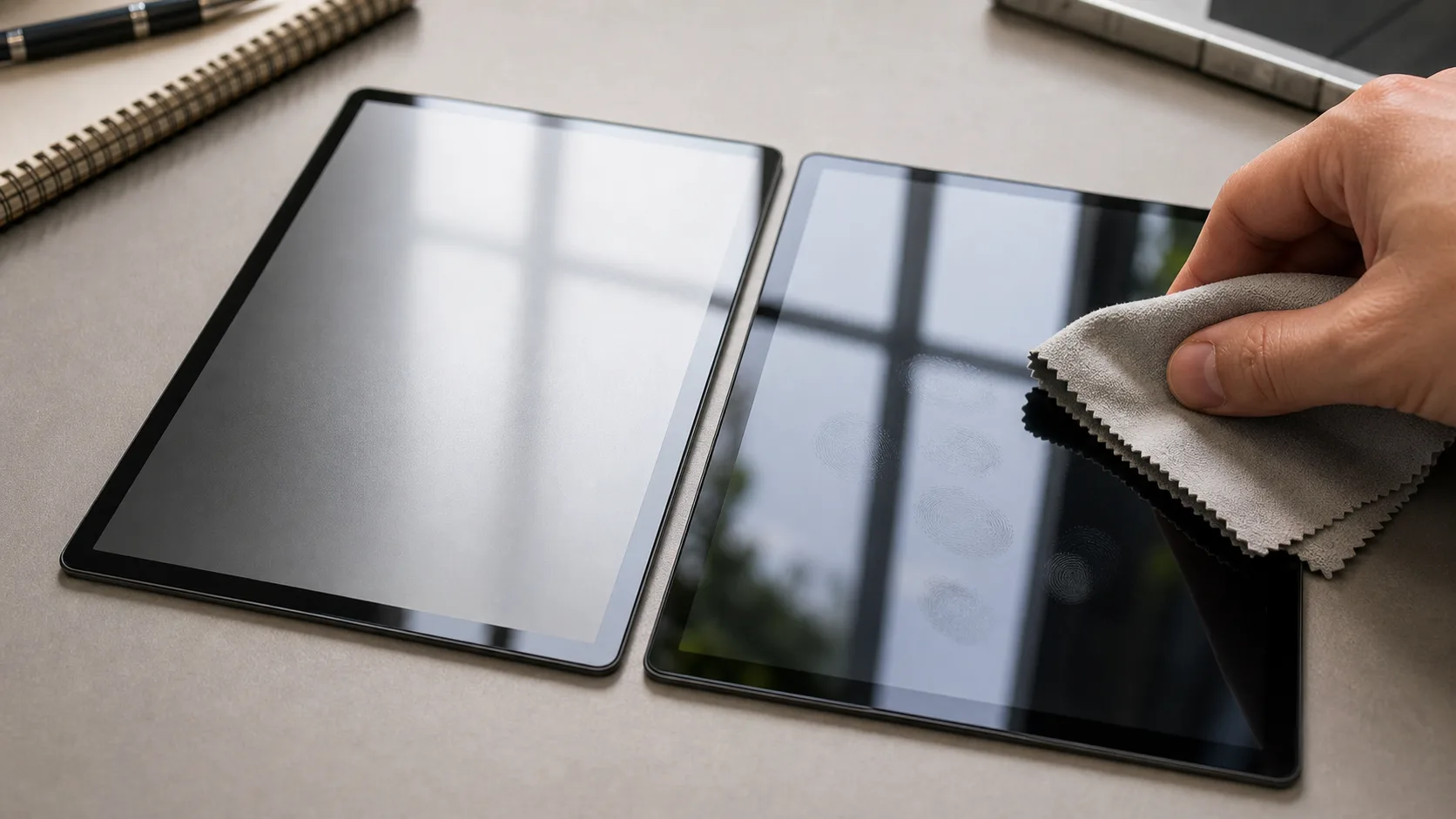
A anti-glare and anti-fingerprint touch display can look like a small component on the bill of materials, but in a consumer product it often becomes the part users judge first. The screen controls the first impression, the perceived speed of the product, the ease of setup, and the confidence users feel when they change a setting or read a warning. For industrial designers, product teams, and display engineers working on consumer-facing screens, the display decision therefore needs to be made with more care than simply choosing the lowest-cost panel that fits the enclosure.
This guide explains surface treatment decisions that affect daily use, cleaning, reflections, and perceived quality. It focuses on practical consumer electronics decisions rather than laboratory theory. The goal is to help teams narrow the display choice, ask better questions to suppliers, and avoid late-stage redesigns caused by brightness, touch, connector, firmware, or mechanical problems.
Consumer products usually have constraints that are different from industrial equipment. The product may sit in a living room, kitchen, bathroom, pocket, or handbag. It may be touched by wet fingers, viewed under sunlight through a window, cleaned with household chemicals, or expected to wake instantly after weeks of standby. A good TFT decision considers all of those conditions before tooling begins.
What Matters Most in a Consumer TFT Design
The most important question is not whether a display specification looks impressive. The better question is whether the module supports the product experience. A bright screen with the wrong viewing angle can still feel cheap. A high-resolution screen with a weak processor can make the interface feel slow. A beautiful cover glass can become a problem if the touch controller is not tuned for the final stack.
For most consumer devices, the key factors are size, resolution, interface, brightness, viewing angle, touch performance, cover glass, thickness, power consumption, and supply continuity. These factors interact. Increasing resolution may force a different interface. Adding thicker cover glass may require touch tuning. Increasing brightness may raise thermal load and shorten battery life. A display should be evaluated as a system, not as a loose panel.
A practical selection process starts with the user interface. Count the number of controls, icons, warnings, and status areas that must appear at the same time. Estimate the viewing distance and the lighting environment. Then choose a display class that supports that experience with some margin. Only after that should the team compare detailed module options.
Typical Applications
A anti-glare and anti-fingerprint touch display is commonly used in products such as kitchen displays, fitness devices, bathroom products, smart home wall panels. These applications share a need for compact visual feedback, but they do not all need the same display. A handheld product may prioritize battery life and impact resistance. A wall-mounted smart home panel may prioritize wide viewing angle and a clean glass surface. A kitchen product may need better coating and sealing because steam, oil, and fingerprints are unavoidable.
The use environment should shape the specification. Indoor products can often use moderate brightness, while window-facing or portable devices need stronger backlight performance. Products used by children or in public spaces may need thicker cover glass and better scratch resistance. Devices with premium positioning may require narrower color variation between production batches, because users notice when replacement units look different.
Application fit also affects software. A simple status display may only need a few colors and basic animation. A richer consumer interface with icons, gradients, and transitions needs more bandwidth and a stronger graphics pipeline. Choosing the display and processor together prevents many integration problems.
Interface and Electronics Choices
The interface determines how easily the display connects to the host processor. Common options for this class of product include capacitive touch controller, standard TFT display interface. SPI can be attractive for compact low-cost products with simple graphics, but it is not ideal for frequent full-screen updates. RGB can be cost-effective and widely available, but it uses more pins and needs careful timing. MIPI-DSI reduces pin count and supports higher resolutions, but it requires host compatibility and more careful bring-up.
Power design deserves equal attention. The LCD logic, backlight, and touch controller may have different voltage rails and sequencing requirements. Backlight current should be reviewed early because it affects brightness, thermal design, battery life, and EMI behavior. If the product uses PWM dimming, the frequency should be chosen to avoid visible flicker and camera banding where possible.
During prototype bring-up, test more than a static image. Run animations, dimming transitions, sleep and wake cycles, touch gestures, and low-battery scenarios. Many display problems only appear when the product behaves like a real product instead of a bench demo.
Mechanical, Touch, and Cover Glass Considerations
The mechanical design around the display has a direct effect on perceived quality. The bezel gap, glass edge, bonding method, and alignment tolerance all change how professional the product feels. Consumer buyers may not know the words optical bonding or cover lens, but they immediately notice dust gaps, uneven borders, reflections, and touch delay.
If the product uses capacitive touch, evaluate the final stack as early as possible. Touch performance depends on cover glass thickness, printed decoration, grounding, air gaps, adhesive, firmware tuning, and noise from the rest of the electronics. A touch panel that works on the supplier’s bench may behave differently inside a plastic enclosure with a switching power supply nearby.
Surface treatment should match the use case. Anti-fingerprint coating helps frequently touched glossy interfaces. Anti-glare treatment improves readability in bright rooms but can slightly soften the image if it is too aggressive. Optical bonding can improve contrast and durability, but it adds cost and process control requirements. The best choice is the one that supports the product’s daily environment.
Selection Checklist
Use the following table as a quick review before committing to a module.
| Decision point | Practical guidance |
|---|---|
| Best fit | surface treatment decisions that affect daily use, cleaning, reflections, and perceived quality |
| Typical products | kitchen displays, fitness devices, bathroom products, smart home wall panels |
| Interface options | capacitive touch controller, standard TFT display interface |
| Main risk | choosing by screen size alone instead of validating optical, electrical, and mechanical requirements |
| Prototype check | test the actual module with the target enclosure, firmware, cover glass, and power supply |
The checklist is intentionally practical. Many display failures are not caused by a missing headline feature. They are caused by small mismatches between the display, enclosure, software, and production process. A consumer product should be tested as a finished assembly before the display choice is frozen.
Common Mistakes to Avoid
One common mistake is selecting the display only by diagonal size. Two modules with the same size can have different active areas, connector locations, thickness, viewing angles, brightness, and software requirements. Another mistake is assuming that a high-resolution panel always improves the product. If the processor cannot update the screen smoothly, the product may feel worse rather than better.
A third mistake is delaying touch and cover glass decisions until late in the project. In consumer products, the front surface is part of the product identity. Changing glass thickness, printing, bonding, or touch controller late can affect tooling, firmware, EMI, and schedule. The display supplier should be involved before the enclosure is finalized.
Finally, teams should avoid relying on a single prototype sample. For mass production, ask about panel lifecycle, tolerance range, color consistency, replacement alternatives, and quality inspection. A display that works once must also be available and consistent for the lifetime of the product.
Practical Recommendation
For most consumer electronics teams, the safest approach is to start with a proven module size and interface, then customize only the parts that create visible product value. Cover glass shape, printed border, touch tuning, FPC length, and backlight target often matter more to the user than exotic specifications. Keep the display architecture simple enough for reliable production, but polished enough that the product feels intentional. This is also where capacitive touch panel fundamentals becomes relevant: a small change in that area can shift the display choice. For deeper context, touch buttons with LED feedback helps frame the trade-offs behind the module specification.
Before final selection, build a small validation plan. Check readability in the real lighting environment, verify touch behavior with the final cover material, measure current at typical and maximum brightness, confirm software frame rate, and run basic thermal and sleep-wake tests. If the module passes these checks, it is far more likely to survive the transition from prototype to consumer-ready product.
Frequently Asked Questions
What is the difference between anti-glare and anti-fingerprint coating?
Anti-glare treatment diffuses reflections to improve readability under bright light. Anti-fingerprint coating is an oleophobic surface treatment that reduces smudges and makes the screen easier to clean.
Can a touch display use both AG and AF treatments?
Yes, many touch displays combine anti-glare and anti-fingerprint treatments. The stack should be tested because strong AG texture can affect clarity and very smooth AF surfaces may change the touch feel.
Which coating is better for kitchen or beauty devices?
Anti-fingerprint coating is usually important because users may touch the screen with oil, water, or cosmetic residue. Anti-glare is useful if the product is used under strong overhead lighting or near windows.