
Touch Buttons with LED Feedback
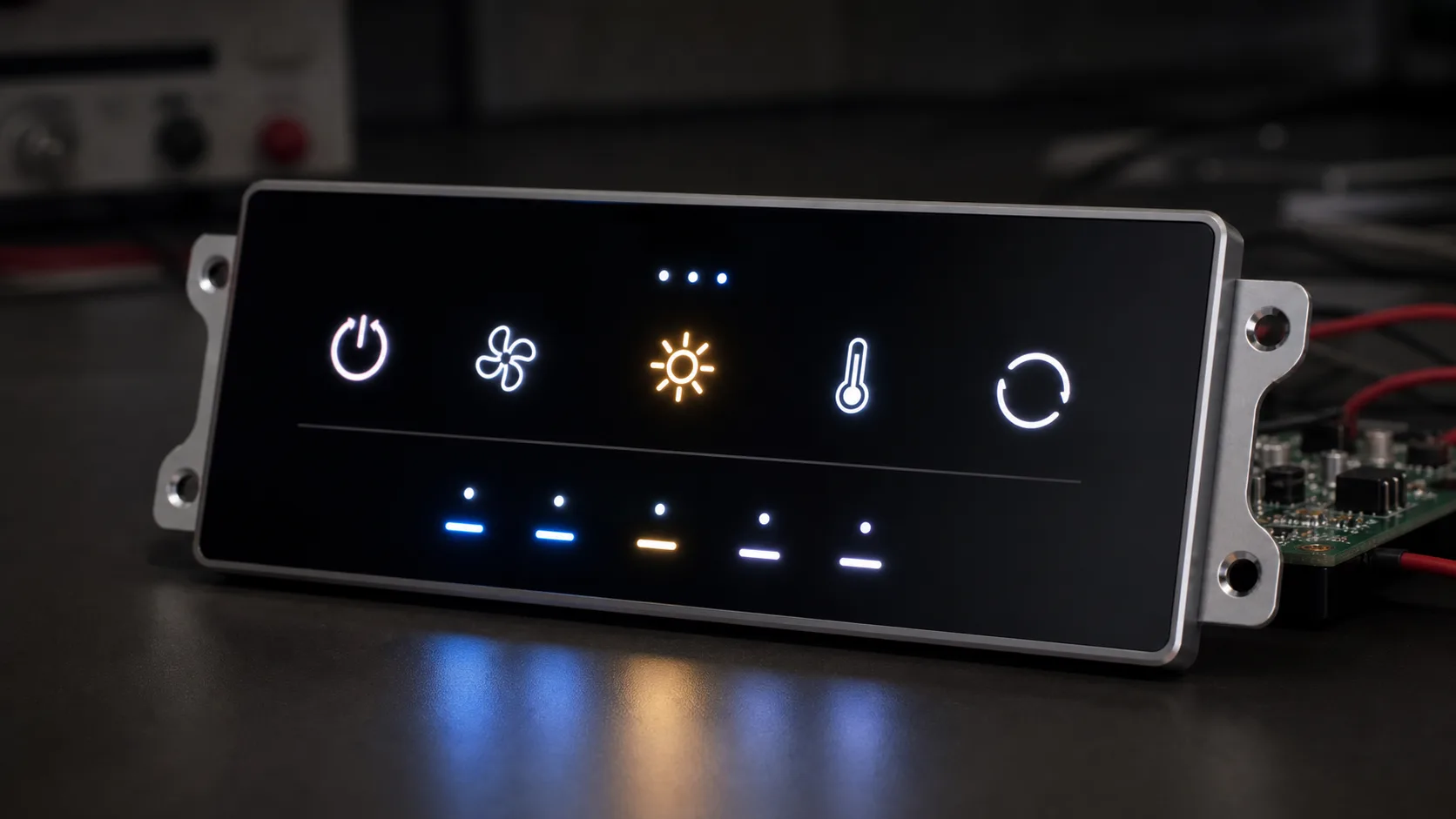
Touch buttons with LED feedback are widely used in modern electronic products, industrial control panels, smart home devices, medical equipment, access control terminals, appliances, and embedded HMI systems. Compared with traditional mechanical buttons, touch buttons provide a cleaner appearance, better sealing, easier maintenance, and a more modern user experience. When combined with LED feedback, they can clearly show button status, operation results, warnings, and system modes.
A touch button is usually based on capacitive sensing. Instead of pressing a physical switch, the user touches an area on the front panel. The controller detects the change in capacitance and converts it into a button event. The LED feedback then provides a visual response, such as lighting up, changing color, blinking, or adjusting brightness.
This design is especially useful in products where the front surface needs to be flat, waterproof, dustproof, easy to clean, or visually simple. However, a good touch button design requires more than placing a touch pad and an LED behind a panel. Engineers must consider sensing reliability, front panel material, LED light guide design, EMI immunity, grounding, firmware logic, user experience, and production testing.
What Are Touch Buttons with LED Feedback?
Touch buttons with LED feedback are user input areas that detect touch electronically and use LEDs to show the state of the button or system. A common design includes a capacitive touch electrode, a touch controller, one or more LEDs, a front cover material, and firmware logic.
The front surface can be glass, acrylic, plastic, metal-coated material, or another non-conductive panel depending on the touch technology. The touch electrode is usually placed behind this surface. When a finger approaches or touches the button area, the capacitance changes. The touch controller detects this change and reports a valid touch event.
The LED feedback can be simple or advanced. A basic product may use a single white LED that turns on when the button is active. A more advanced control panel may use RGB LEDs to show different modes, warning states, or selected functions. Some designs use breathing effects, brightness transitions, or blinking patterns to guide the user.
Why Use Touch Buttons Instead of Mechanical Buttons?
Touch buttons are often selected because they improve both product appearance and reliability.
A mechanical button requires a moving structure, opening, spring, dome, or switch body. Over time, mechanical parts can wear out, collect dust, become loose, or lose tactile feel. In environments with moisture, oil, cleaning chemicals, or dust, openings around mechanical buttons can create reliability problems.
A touch button can be placed behind a continuous front surface. This allows a seamless design with no physical gaps. It is easier to clean and easier to seal. For medical devices, kitchen appliances, industrial panels, bathroom devices, and outdoor terminals, this can be a major advantage.
Touch buttons also support flexible visual design. Icons, text, symbols, and LED windows can be printed or laser-etched on the front panel. The product can look more modern and premium compared with traditional mechanical switches.
However, touch buttons do not provide natural mechanical travel. This is why LED feedback is important. The LED gives the user confirmation that the touch has been detected and that the system has responded.
Typical Applications
Touch buttons with LED feedback are used in many products.
In smart home panels, they can control lighting, curtains, HVAC, scenes, doorbell functions, and security modes. LED feedback can show whether a device is on, off, active, disabled, or in alarm state.
In industrial control panels, touch buttons can be used for start, stop, reset, menu navigation, mode selection, and parameter confirmation. LEDs can indicate operating state, warning state, machine ready status, or selected function.
In medical and laboratory equipment, a sealed touch surface is useful for cleaning and disinfection. LED feedback can guide the user through operation steps or indicate measurement status.
In home appliances, touch buttons are widely used in ovens, washing machines, air conditioners, water purifiers, induction cookers, coffee machines, and kitchen control panels. The flat surface improves appearance and cleaning.
In access control terminals and public devices, touch buttons can be used for numeric input, doorbell calling, function selection, or wake-up operation. LED feedback helps users understand the current state in low-light environments.
Capacitive Touch Sensing Basics
Most touch buttons use capacitive sensing. A capacitive touch system measures changes in capacitance around an electrode. A human finger acts as a conductive object and changes the electric field near the sensor pad.
There are two common sensing methods: self-capacitance and mutual-capacitance.
Self-capacitance measures the capacitance of one electrode relative to ground. It is simple and widely used for button applications. It can provide good sensitivity, but it may be more affected by environmental noise.
Mutual-capacitance uses a transmit and receive electrode structure. It is commonly used in touch screens, sliders, wheels, and more advanced touch interfaces. It can provide better multi-touch behavior, but the design is more complex.
For simple touch buttons, self-capacitance is often enough. The key is to design the electrode size, front panel thickness, grounding, and firmware threshold correctly.
Front Panel Material and Thickness
The front panel is one of the most important parts of a touch button design. The touch signal must pass through this material, and the LED light must also be visible through or around it.
Common front panel materials include:
- Tempered glass
- Acrylic
- Polycarbonate
- ABS plastic
- PMMA
- Printed decorative film
- Ceramic glass
- Non-metal front panels
Glass provides a premium appearance, good scratch resistance, and easy cleaning. It is widely used in smart control panels, appliances, medical devices, and access terminals. However, glass thickness affects touch sensitivity. Thicker glass requires larger electrodes, higher sensitivity, and careful tuning.
Plastic is easier to mold and can be lower cost, but it may scratch more easily and may change properties under heat or UV exposure. Acrylic and polycarbonate are common for decorative panels and LED windows.
Metal is difficult for standard capacitive touch because it blocks the electric field. Some special technologies can detect touch on metal surfaces, but they require different sensing methods and mechanical design.
Panel thickness should be selected carefully. A very thick front panel can reduce touch sensitivity and make the button less responsive. A very thin panel may be easier to sense but less durable. In many products, 1 mm to 3 mm glass or plastic is common, but the actual value depends on the controller, electrode size, and product requirement.
Electrode Design
The touch electrode is the sensing area behind the front panel. Its size, shape, spacing, and connection strongly affect performance.
For a simple button, the electrode is usually circular, square, or icon-shaped. A larger electrode generally provides stronger signal, but it may also increase noise sensitivity and reduce spacing between buttons. Small electrodes may look compact but can be difficult to detect through thick glass.
Engineers should consider:
- Button size
- Distance between adjacent buttons
- Front panel thickness
- Ground clearance
- Trace length
- Nearby metal parts
- LED position
- PCB stack-up
- Noise sources
- Water or glove requirements
A common mistake is placing ground copper too close to the touch electrode. Excessive ground near the electrode can reduce sensitivity. Another common mistake is routing noisy signals near touch traces. PWM LED lines, switching power supplies, LCD signals, and high-current traces can interfere with touch sensing.
If the touch button must work with gloves or through thick glass, electrode size and sensitivity must be increased carefully. However, too much sensitivity can cause false triggers.
LED Feedback Design
LED feedback is what makes touch buttons feel responsive. Since there is no physical click, the user needs a visual signal to confirm operation.
LED feedback can be used in several ways:
- LED off means inactive
- LED on means active
- Blinking means warning or waiting
- Breathing effect means standby or pairing
- Color change means different modes
- Brightness change means level or intensity
- Short flash means touch confirmation
Single-color LEDs are simple and low cost. They are suitable for basic on/off indicators. Dual-color or RGB LEDs provide more information but require more control lines, more firmware logic, and better optical design.
The LED should be placed so that the light appears uniform and does not create bright spots. If the LED is directly behind a small icon, the center may be too bright and the edges too dark. A light guide, diffuser film, frosted window, or printed translucent layer can improve uniformity.
For premium products, the LED effect should be soft and controlled. Harsh light leakage, uneven brightness, or inconsistent color can make the product look cheap.
Light Guide and Optical Structure
A good LED feedback design often requires optical structure design. The LED itself is a point light source, but the user usually expects a clean illuminated icon or ring.
Several methods can be used:
- Light guide plate
- Diffuser film
- Semi-transparent printing
- Laser-etched icon
- Frosted plastic window
- Reflective cavity
- Silicone light pipe
- Side-lit structure
If the front panel uses printed black or white ink, the icon area can be made semi-transparent. The LED shines through the icon. The ink thickness and transmittance must be controlled carefully.
If multiple buttons are close together, light leakage between buttons must be prevented. Otherwise, one LED may illuminate nearby icons. Mechanical barriers, black foam, separate light guides, or PCB-level spacing can help.
Optical testing should be done in both bright and dark environments. An LED that looks good in a lab may be too bright in a dark room or too dim under sunlight.
Firmware Logic and Touch Feedback
Touch button firmware should not simply turn an LED on whenever the sensor detects a touch. Good firmware needs filtering, debounce, state control, and feedback timing.
Common firmware functions include:
- Baseline calibration
- Touch threshold detection
- Debounce filtering
- Long-press detection
- Short-press detection
- Multi-button handling
- Auto-recalibration
- Noise filtering
- LED state control
- Sleep and wake behavior
Touch sensing can be affected by temperature, humidity, hand moisture, nearby objects, and power noise. The firmware should track baseline changes slowly while still detecting real touches quickly.
LED feedback should match the user action. For example, when the user touches a button, the LED may flash briefly to confirm input. If the function is turned on, the LED may remain on. If the system rejects the operation, the LED may blink or show a warning color.
The timing should feel natural. If the LED response is delayed, users may touch again. If the LED turns off too quickly, users may not notice the feedback.
EMI and Noise Immunity
Industrial and appliance environments can contain significant electrical noise. Motors, relays, switching power supplies, heaters, inverters, backlight drivers, and wireless modules can all interfere with capacitive touch sensing.
Noise problems may cause false touches, missed touches, unstable baselines, or random LED behavior.
Good design practices include:
- Keep touch traces short
- Avoid routing touch traces near PWM or high-current lines
- Use proper grounding strategy
- Add guard traces if supported
- Use stable power supply for the touch controller
- Filter noisy power rails
- Separate LED drive currents from touch sensing areas
- Avoid large metal parts close to electrodes
- Follow touch controller layout guidelines
LED PWM can be a source of noise. If the LED brightness is controlled by PWM, the PWM frequency and routing should be selected carefully. The LED driver should not inject noise into the touch sensing ground or power supply.
For industrial products, EMC testing should include touch operation. A design that works on the bench may fail during ESD or radiated immunity tests if the layout is weak.
Water, Gloves, and Harsh Environments
Many touch button products need to work in real-world conditions. Users may have wet fingers, dry fingers, gloves, or dirty hands. The surface may be exposed to water droplets, cleaning liquid, oil, dust, or condensation.
Water can be challenging for capacitive touch because it changes the electric field and may connect multiple electrodes. This can cause false touches or block real touches. Some touch controllers support water rejection algorithms, but the hardware layout and front panel design still matter.
Glove operation requires stronger sensitivity. The controller must detect a weaker signal through the glove material. However, increasing sensitivity too much can increase false triggers.
For appliances, medical devices, and industrial products, cleaning chemicals may be used. The front material, printing, coating, and sealing must resist repeated cleaning.
If the product is used outdoors or in a wet environment, the front panel should be sealed properly. A flat glass or plastic surface is easier to seal than mechanical buttons, which is one of the main reasons touch buttons are chosen.
User Experience Considerations
Touch buttons should be easy to understand and operate. The icon, label, LED feedback, and touch area should match the user’s expectation.
Important UX points include:
- Button area should be large enough
- Icons should be clear
- LED feedback should be visible
- Operation state should be easy to understand
- Critical buttons should avoid accidental touch
- Long-press behavior should be obvious
- Disabled buttons should look disabled
- Error feedback should be clear
- Brightness should be comfortable at night
For safety-related or critical machine operations, touch buttons may not be enough. Emergency stop, safety reset, and critical machine controls often still require mechanical buttons with physical feedback and safety certification.
Touch buttons are best used for user interface functions, mode selection, menu operation, lighting control, scene control, and non-safety functions.
Mechanical and Sealing Design
Mechanical design affects both touch sensitivity and LED appearance. The distance between electrode and front panel must be consistent. Air gaps, uneven adhesive, loose assembly, or bending can cause inconsistent sensitivity.
If the PCB is too far from the front panel, the signal may become weak. If the PCB moves during operation, the baseline may drift. A stable mechanical structure is important.
For sealed products, the gasket or adhesive must not create uneven pressure or optical distortion. If the front panel is glass, it must be supported properly to avoid cracking.
For LED feedback, the mechanical structure should block light leakage. Each button may need a separate light chamber or isolation wall. This is especially important when using multiple LEDs or RGB effects.
Production Calibration and Testing
Touch buttons should be tested during production. A product that works in development may have variation in mass production due to glass thickness, ink layer, PCB tolerance, assembly gap, LED position, or controller sensitivity.
Production testing may include:
- Touch detection test
- Multi-button test
- LED color test
- LED brightness test
- Button response time test
- Long-press test
- False touch test
- Power cycling test
- Sleep and wake test
- ESD test
- Water drop test if required
- Glove test if required
Some touch controllers support automatic calibration. However, production should still verify that each button responds correctly. LED color and brightness should also be checked because LED bins and assembly variation can affect appearance.
For products with strict appearance requirements, optical inspection may be needed to detect light leakage, uneven brightness, or printing defects.
Common Design Problems
Several problems are common in touch button projects.
One problem is false triggering. This may be caused by excessive sensitivity, poor grounding, water, EMI, or nearby metal. Another problem is missed touches, usually caused by low sensitivity, thick glass, small electrodes, or poor contact between PCB and front panel.
LED light leakage is another common issue. If the light chamber is not isolated, one button may illuminate another icon. Bright spots can also occur if the LED is too close to the front window without diffusion.
Touch and LED interference can also happen. PWM LED drive signals can affect capacitive sensing if the layout is not carefully designed.
Mechanical inconsistency can cause some buttons to feel more sensitive than others. If the air gap between the electrode and front panel varies across the product, touch response may vary.
These problems can usually be avoided through early layout review, prototype testing, optical simulation, firmware tuning, and production validation.
Best Practices
A reliable touch button with LED feedback should be designed as a complete system. The PCB, front panel, LED, light guide, firmware, enclosure, and power supply must work together.
Best practices include:
- Choose a touch controller suitable for the environment
- Keep electrode size appropriate
- Maintain consistent distance to the front panel
- Avoid noisy routing near touch traces
- Design LED light isolation early
- Use diffuser or light guide for uniform illumination
- Tune thresholds with the final cover material
- Test with wet fingers and gloves if required
- Validate EMI and ESD performance
- Define clear LED state logic
- Include production test procedures
- Avoid using touch buttons for critical safety functions
Good design should be verified in the final enclosure, not only on a prototype PCB.
Conclusion
Touch buttons with LED feedback are a practical and attractive solution for modern control panels, smart home devices, industrial interfaces, appliances, medical equipment, and access terminals. They provide a clean front surface, good sealing potential, flexible appearance, and clear visual feedback.
However, successful implementation requires careful design. The touch electrode, front panel material, LED placement, light guide, grounding, EMI immunity, firmware logic, and mechanical structure all affect the final result. LED feedback is not only decoration. It is an important part of the user experience because it confirms touch input and communicates system status.
When designed correctly, touch buttons with LED feedback can make a product look modern, feel responsive, and operate reliably over long-term use. For embedded and industrial products, they are especially useful when appearance, cleanability, sealing, and intuitive operation are important.