What Is a Touchscreen Cover Lens? A Complete Guide
What Is a Touchscreen Cover Lens?
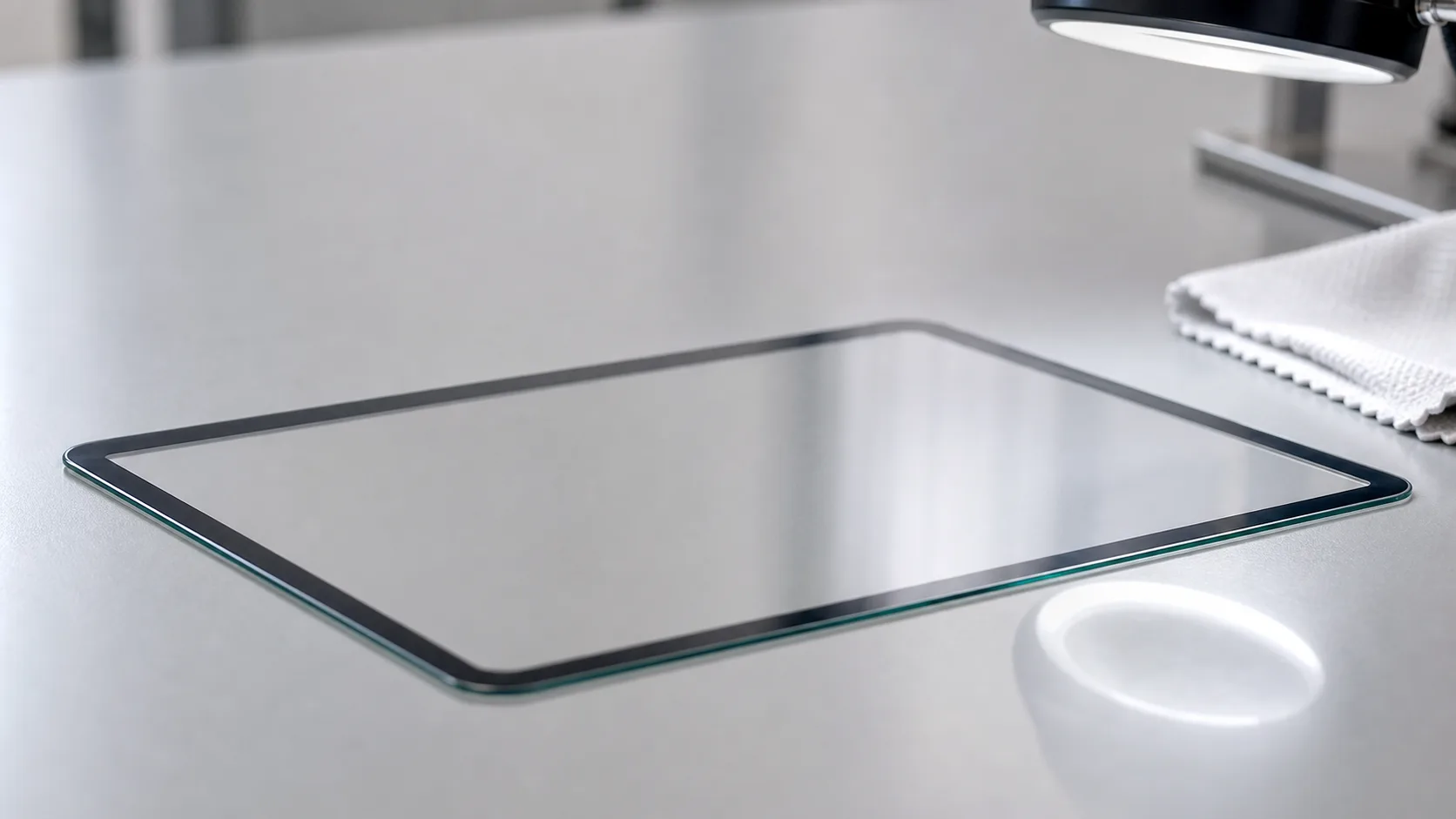
A cover lens—also known as a cover glass, touch lens, or protective lens—is the top protective layer you touch on a touchscreen display.
It sits above the touch sensor (capacitive or resistive) and the LCD or AMOLED module, providing mechanical strength, optical clarity, and surface protection.
Modern touch devices, from smartphones and handheld terminals to industrial HMIs, all rely on a well-designed cover lens to ensure durability, readability, and comfortable user interaction.
This guide explains:
- What a cover lens does
- The materials used (glass vs. plastic)
- How cover lenses are manufactured
- Surface treatments such as AG / AR / AF
- Cover lens thickness recommendations
- Optical bonding options
- Key engineering considerations for embedded and industrial products

Why the Cover Lens Matters
Although it may look like a simple piece of glass, a high-quality cover lens performs several critical functions:
1. Protection
Shields the display and touch sensor from:
- Impact
- Scratches
- Chemicals
- Dust and moisture
2. Optical Performance
Maintains visual clarity through:
- High light transmission
- Low haze
- Low surface reflection (with AR/AG/AF coatings)
3. Touch Interaction
Ensures smooth and responsive touch operation, especially for capacitive panels.
4. Aesthetic Customization
Supports:
- Custom shapes
- Logos
- Icons
- Color printing (e.g., black frame, white frame, custom brand colors)
5. Environmental Resistance
Industrial devices often need:
- High durability
- UV resistance
- Operation in harsh temperatures
- Waterproof or sealed designs (IP65–IP67)
Materials Used for Cover Lenses
1. Glass Cover Lens (Most Common)
Glass is the most widely used material due to its:
- High hardness (scratch resistance)
- Strong chemical resistance
- Superior optical clarity
- High durability and reliability
Common types:
- Tempered glass
- Chemically strengthened glass
- Gorilla-type aluminosilicate glass
- Soda lime glass (cost-effective industrial option)
Recommended for:
Consumer electronics, industrial HMIs, POS terminals, medical devices, automotive dashboards.
2. Plastic Cover Lens (PC / PMMA)
Advantages:
- Lightweight
- Flexible
- Impact-resistant
- Lower cost for complex shapes
Disadvantages:
- Easier to scratch
- Slightly lower transparency
- Prone to chemical damage
Recommended for:
Outdoor wearables, rugged equipment, curved or non-flat lenses.
Manufacturing Processes
Cover lens production includes multiple precision processes:
1. Cutting and Shaping
- CNC cutting
- Laser cutting
- Waterjet cutting (for thick industrial glass)
2. Edge Processing
To prevent cracking and improve safety:
- 2D edge polish
- 2.5D rounded edge
- 3D curved edge for consumer devices
3. Strengthening
- Thermal tempering
- Chemical ion-exchange strengthening
4. Surface Treatments (Optional but Common)
- Anti-glare (AG)
- Anti-reflective (AR)
- Anti-fingerprint (AF / oleophobic)
- Anti-smudge
- Hard coating
- UV coating
5. Color Printing
Silk-screen printing of:
- Logo
- Frame border
- Indicators or icons
- Custom UI elements for HMIs
Key Surface Treatments
1. Anti-Glare (AG)
Diffuse reflection to improve readability under bright light.
Used in industrial HMIs, outdoor devices, medical equipment.
2. Anti-Reflective (AR)
Reduces surface reflectance to improve contrast and clarity.
Ideal for high-brightness display applications.
3. Anti-Fingerprint (AF) / Oleophobic Coating
- Smooth touch feel
- Prevents smudges and oil residue
- Easier to clean
4. Hard Coating
Adds scratch resistance, essential for plastic cover lenses.
Cover Lens Thickness Guidelines
Typical thicknesses:
- 0.55 mm — Wearables, compact devices
- 0.7–1.1 mm — Consumer electronics
- 1.1–3.0 mm — Industrial HMIs, rugged touch systems
Trade-off:
- Thicker glass = higher durability
- Thinner glass = better optical clarity + improved touch sensitivity
Optical Bonding Options
How the cover lens attaches to the display has major impact on optical quality.
1. Air Gap Bonding
Traditional method using gasket and frame.
Pros
- Low cost
- Easy replacement
Cons
- Light reflections between layers
- Lower readability under sunlight
- Dust can enter edge gaps
2. Full Optical Bonding (OCA or LOCA)
OCA (Optically Clear Adhesive) or LOCA (Liquid Optical Clear Adhesive) removes the air gap.
Benefits:
- Higher contrast
- Near-zero reflection
- Better strength
- Improved outdoor visibility
- Prevents condensation
This is the preferred method for industrial, automotive, and premium consumer devices.
Industrial vs Consumer Cover Lens Requirements
| Feature | Consumer Devices | Industrial Devices |
|---|---|---|
| Durability | Medium | Very high |
| Temperature | 0–50°C | −20°C to 70°C |
| Touch | Multi-touch | Single or multi, gloves supported |
| Surface | Glossy, AF | AG/AR, hard-coating |
| Design | Curved, 3D shapes | Flat, strengthened |
| Bonding | OCA | OCA or LOCA |
| Waterproof | Moderate | IP65–IP67 |
Industrial designs prioritize readability + durability, while consumer devices emphasize aesthetics + smooth touch feel.
Applications of Cover Lenses
- Smart home touch panels
- Industrial automation HMIs
- Medical monitoring devices
- Smart appliances
- Automotive dashboards and infotainment
- POS and payment terminals
- Outdoor kiosks and vending machines
- Wearable devices
- Rugged handheld terminals
Every modern touch interface depends on a well-designed cover lens.
Design Tolerances Engineers Should Confirm
Cover lens drawings should define more than the outside size. Small mechanical details affect assembly yield, touch performance, and long-term reliability. Before releasing a drawing, confirm the tolerance stack between the cover lens, touch sensor, LCD active area, adhesive, gasket, housing, and screw bosses.
Important drawing items include:
| Item | Why It Matters |
|---|---|
| Outer dimensions | Determines fit inside the housing |
| Viewing window | Must align with the LCD active area |
| Ink border width | Hides adhesive, sensor traces, and module edges |
| Edge radius | Reduces chipping and improves hand feel |
| Hole and notch tolerance | Affects buttons, cameras, LEDs, and sensors |
| Flatness | Influences bonding quality and touch uniformity |
| Surface hardness | Defines scratch resistance expectations |
For capacitive touch products, the distance between the user’s finger and the sensor matters. A thicker cover lens, air gap, glove requirement, or decorative ink stack can reduce touch sensitivity. This does not mean thick glass should be avoided; it means the touch controller must be tuned and validated with the final cover lens, not only with a lab sample.
Printing, Icons, and Dead Front Areas
Many cover lenses include black borders, logos, status icons, or hidden capacitive keys. These features are usually produced by screen printing ceramic or organic ink on the back side of the lens. Back-side printing protects the graphic from abrasion, but it also creates design constraints.
Ink thickness can affect bonding flatness. Multiple ink layers may be needed to block backlight leakage around the LCD edge, especially on black frames. If icons need to glow through the cover lens, the ink stack must balance daytime invisibility with nighttime readability. This is common in appliances, smart home panels, and industrial key areas where a “dead front” look is preferred.
Engineers should review printed areas together with the backlight, LED indicators, and touch button design. If an icon is too close to a capacitive key electrode, the visual center and electrical touch center may not feel aligned to the user.
Reliability Tests for Cover Lens Designs
A cover lens may look correct during prototype assembly but fail after repeated use, cleaning, or temperature cycling. For consumer and industrial products, validation should include both optical and mechanical checks.
Typical tests include:
- Pencil hardness or scratch testing for surface durability.
- Steel ball drop or impact testing for strengthened glass.
- Thermal cycling to check stress, printing adhesion, and bonding stability.
- High humidity storage for adhesive and ink reliability.
- Chemical resistance tests using cleaners expected in the target environment.
- Touch operation tests with dry fingers, wet fingers, gloves, and edge touches.
Outdoor and industrial devices often need additional UV exposure, salt mist, or gasket compression checks. The correct test plan depends on the product environment, but the principle is simple: validate the cover lens as part of the full display stack, not as an isolated glass part.
Conclusion
The cover lens is one of the most important components of any touchscreen device.
It affects durability, usability, optical clarity, and overall user experience.
Whether you are designing a compact wearable, a medical touchscreen, or a rugged industrial HMI, choosing the right cover lens material, thickness, surface treatment, and bonding method will directly impact the final product.
Related Articles
- Resolution & Aspect Ratio — Understand how resolution and aspect ratio affect display performance and user experience.
- TN vs IPS vs VA — Compare three major LCD panel technologies and choose the right one for your project.
Frequently Asked Questions
What is the difference between cover glass and cover lens?
In many touchscreen projects the terms are used almost interchangeably. Cover glass usually refers to a glass protective layer, while cover lens can also include plastic lenses, printed borders, icons, holes, coatings, and custom shapes.
How thick should a touchscreen cover lens be?
Thickness depends on product size, impact requirement, touch sensitivity, and housing design. Wearables may use thin glass, while industrial HMIs often use thicker strengthened glass for durability.
Does a thicker cover lens reduce touch performance?
It can. A thicker lens increases the distance between the finger and touch sensor, so the touch controller may need tuning. The final lens, bonding stack, and glove or wet-finger requirements should be tested together.